Small Text Generator - Create Tiny Letters Instantly
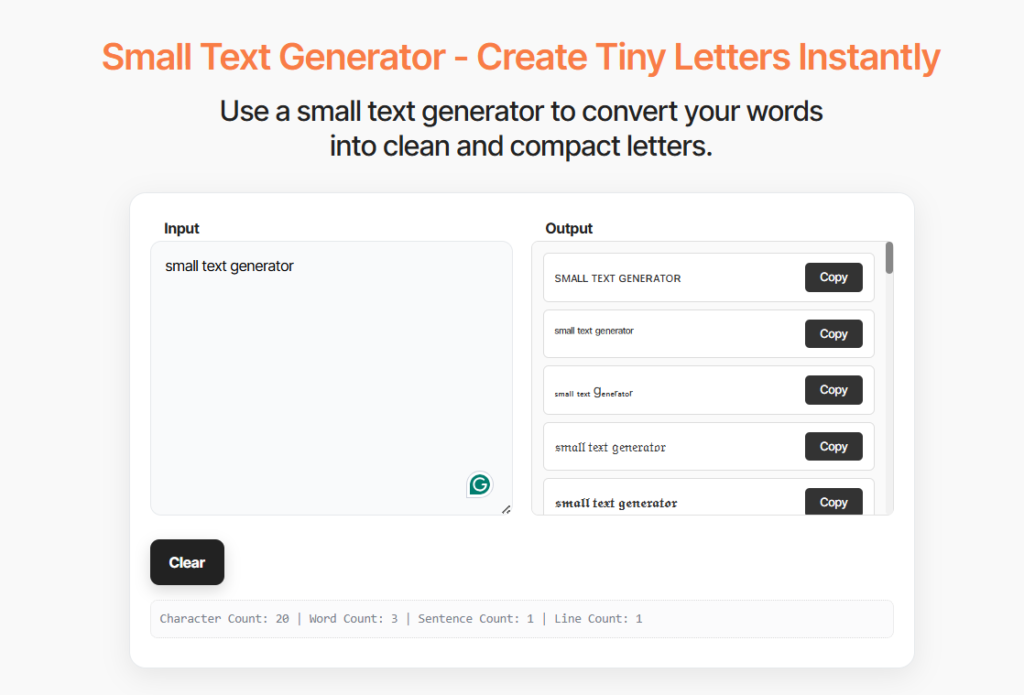
Use a small text generator to convert your words into clean and compact letters.
Share with others!
How Small Text Generator Works?
This tool converts your normal text into tiny Unicode characters you can copy and paste anywhere. Type your text, pick a style (small caps, superscript, or subscript), and you’ll get miniature letters that work on Instagram, Discord, Twitter, and every major platform.
Unlike font changes that only work in specific apps, our small text generator uses Unicode symbols, actual characters built into every device. You paste ˢᵐᵃˡˡ ᵗᵉˣᵗ into an Instagram bio, and it displays correctly for everyone who views your profile. No special fonts required.
This makes your content stand out. Use small text for Instagram captions, Discord status messages, Twitter bios, or anywhere you want compact, eye-catching formatting. The characters look tiny, but they’re just as readable as normal text, and they work in any app that accepts Unicode.
How to Use the Small Text Generator
Convert text to tiny characters in three steps:
1. Type or paste your text into the converter box above. You can enter anything: sentences, words, usernames, or entire paragraphs.
2. Choose your small text style from the options that appear. Pick small caps for ᴄʟᴇᴀɴ ᴍɪɴɪᴀᴛᴜʀᴇ ʟᴇᴛᴛᴇʀs, superscript for ˢᵘᵖᵉʳ ᵗⁱⁿʸ ᵗᵉˣᵗ, or subscript for ᵦₐₛₑₗᵢₙₑ ₛₘₐₗₗ ₜₑₓₜ.
3. Click the copy button next to your preferred style. The small text copies to your clipboard automatically.
4. Paste your tiny text anywhere you want it, Instagram bio, Discord username, Twitter post, Facebook comment, or any social media platform.
The converter works instantly. You see your small text preview in real-time as you type, so you know exactly what you’re getting before you copy.
Creative Ways People Use Small Text
Beyond basic formatting, small text unlocks creative possibilities that normal-sized characters can’t achieve.
Aesthetic Instagram Bios
Create a visual hierarchy in your 150-character bio. Put your main identifier in normal text, then add credentials, location, or contact info in small caps beneath it.
Example:
Sarah Martinez
ᴘʜᴏᴛᴏɢʀᴀᴘʜᴇʀ | ʟᴏs ᴀɴɢᴇʟᴇs
ᴀᴠᴀɪʟᴀʙʟᴇ ғᴏʀ ᴡᴇᴅᴅɪɴɢs & ᴇᴠᴇɴᴛs
Three Types of Small Text (What Makes Them Different)
Our generator creates three distinct small text styles using different Unicode character sets. Each serves a different purpose.
Small Caps (ᴛɪɴʏ ᴄᴀᴘɪᴛᴀʟ ʟᴇᴛᴛᴇʀs)
Small caps convert your text to miniature capital letters. This style offers the most complete character coverage; almost every letter has a small caps equivalent in Unicode. You’ll see these frequently on Tumblr, Instagram, and Twitter because they work consistently across platforms.
The alphabet: ᴀʙᴄᴅᴇғɢʜɪᴊᴋʟᴍɴᴏᴘǫʀsᴛᴜᴠᴡxʏᴢ
Use small caps for: Professional-looking bios, clean minimalist aesthetics, subtle emphasis without shouting.
Superscript (ˢᵐᵃˡˡ ᵗᵉˣᵗ ᵃᵇᵒᵛᵉ ᵗʰᵉ ˡⁱⁿᵉ)
Superscript characters sit above the baseline, creating that “floating” tiny text effect. Unicode includes these primarily for mathematical notation and footnotes. Some letters (like q and i) don’t have perfect superscript versions, so we use the closest available characters.
The alphabet: ᵃᵇᶜᵈᵉᶠᵍʰⁱʲᵏˡᵐⁿᵒᵖᵠʳˢᵗᵘᵛʷˣʸᶻ
Use superscript for: Math expressions (x²), footnote references, trademark symbols, creative emphasis.
Subscript (ₛₘₐₗₗ ₜₑₓₜ ᵦₑₗₒw ₜₕₑ ₗᵢₙₑ)
Subscript characters drop below the baseline. Unicode’s subscript alphabet has the most gaps; many letters lack official subscript equivalents. We include what’s available, but this style works best for specific use cases like chemical formulas.
The alphabet: ₐbcdₑfgₕᵢⱼₖₗₘₙₒₚqᵣₛₜᵤᵥwₓyz
Use subscript for: Chemical formulas (H₂O), mathematical notation, scientific expressions, unique visual effects.
When You Need Small Text (Real Uses That Make Sense)
Small text serves specific purposes where normal-sized characters won’t work as well or won’t fit.
Instagram Bio Character Limits
Instagram gives you 150 characters for your bio. Small text lets you pack more information into that space while keeping your bio readable. Use tiny letters for credentials, location tags, or website links that don’t need full emphasis. Your main message stays normal size while supplementary details appear in small caps.
Example: “Photographer 📸 | ʙᴀsᴇᴅ ɪɴ ɴʏᴄ | Available for bookings”
Discord Usernames and Status
Stand out in Discord servers by adding small text to your username or custom status. The tiny characters make your name distinctive without being obnoxious. Superscript works particularly well for clan tags, nicknames, or role indicators.
.Professional Signatures
Email signatures look cleaner with small caps for job titles, phone extensions, or secondary contact info. The small text creates visual hierarchy, your name appears normal while supporting details stay accessible but unobtrusive.
YouTube Comments
YouTube supports Unicode small text in comments. Use it for emphasis, formatting variety, or to make your comments visually distinct from others. Small caps tend to work best here since they’re the most readable at smaller sizes.
Creative Typography
Mix normal and small text for artistic effects in graphics, social media art, or digital designs. The contrast between regular and tiny letters creates visual interest without requiring graphic design software.
Why This Small Text Generator Works Everywhere
This generator uses real Unicode characters, not custom fonts that break when you copy them elsewhere.
Instant Conversion
You see your small text as you type. No waiting, no “generate” button, no processing delays. The converter transforms characters in real-time, so you can experiment with different styles instantly.
Three Complete Styles
We provide small caps, superscript, and subscript, the three primary Unicode small text alphabets. Each style has its own use case, and you get all three with one tool.
One-Click Copying
Click “Copy” next to any style, and the text goes straight to your clipboard. You don’t select, right-click, and choose copy. One button does everything.
Works in Your Browser
No download, no installation, no account creation. The tool runs entirely in your browser. Your text never touches our servers, complete privacy guaranteed.
Mobile Compatible
Generate small text on your phone with the same speed and features as a desktop. The interface adapts to touchscreens, making it easy to create tiny text wherever you are.
Universal Platform Support
The small text works on Instagram, Discord, Twitter, Facebook, Reddit, YouTube, TikTok, WhatsApp, and any platform that accepts Unicode. Some restrictive fields may block special characters, but the vast majority of sites support our small text.
How Small Text Actually Works (The Unicode Explanation)
Small text isn’t a font. It’s a collection of special characters built into Unicode, the universal character encoding standard that powers text on every modern device.
What Makes Unicode Special
Unicode contains over 149,000 characters covering nearly every writing system in human history, plus mathematical symbols, emojis, and special formatting characters. Among these are three alphabets designed to render smaller than normal text: small capitals, superscript, and subscript.
When you use our small text generator, you’re not changing fonts. You’re swapping regular letters (like “a”) for their Unicode small equivalents (like “ᴀ” for small caps or “ᵃ” for superscript). These are distinct characters with their own Unicode positions, which is why they copy and paste perfectly.
Why Font Changes Don’t Work
If you change your text to a small font in Word or Photoshop, it only appears small in that program. Copy it to Instagram, and it reverts to normal size because you’re still using standard letters, just with size metadata that other apps ignore.
Unicode small text has no size metadata. The character itself is inherently small, so it displays the same way everywhere.
The Limitations You Should Know
Unicode’s small text alphabets aren’t complete. Small caps cover almost all letters, but superscript and subscript have gaps; some letters never got official Unicode superscript or subscript versions. When we encounter missing characters, we substitute the closest available equivalent.
This is why you might see regular-sized letters mixed into your subscript text. It’s not a bug in our generator; it’s a limitation of Unicode itself. We use every available small character, but we can’t create characters that don’t exist in the standard.
Where Small Text Works (And Where It Doesn't)
Small text works on nearly every social media platform and messaging app, but a few restrictive environments block Unicode formatting characters.
Full Support (Works Perfectly)
- Instagram (bios, captions, comments, DMs)
- Twitter/X (bios, tweets, replies)
- Discord (usernames, status, messages, server names)
- Facebook (posts, comments, bios, pages)
- Reddit (comments, posts, usernames)
- YouTube (comments, community posts)
- TikTok (bios, comments)
- WhatsApp (messages, status)
- Telegram (messages, bios)
- Tumblr (posts, bios, tags)
Partial Support (May Work)
Some professional platforms limit Unicode to prevent formatting abuse. LinkedIn occasionally restricts certain Unicode ranges. Email clients display small text, but may strip it in subject lines depending on the provider.
Limited Support (Often Blocked)
Gaming platforms (Steam, Epic) sometimes block Unicode in usernames to prevent impersonation. Banking apps and government websites typically strip all formatting characters for security.
The Bottom Line
If you’re posting on social media, messaging friends, or creating content for general audiences, small text works. For highly restricted professional or security-focused platforms, stick with standard characters.
Test small text in any new platform by posting it privately first. If it displays correctly in preview, it’ll work for everyone.
Small Text Tips and Common Issues
Most small text works flawlessly, but you might encounter these situations.
Some Letters Look Normal-Sized
This happens with subscript and occasionally superscript. Unicode doesn’t include every letter in these alphabets, so we substitute with the closest available character. It’s a Unicode limitation, not a tool error. Switch to small caps if you need complete character coverage.
Text Looks Different on Mobile vs. Desktop
Device fonts render Unicode characters slightly differently. Your small text will always be readable, but the exact appearance varies by operating system and browser. This is normal and doesn’t affect functionality.
Platform Won’t Accept My Small Text
Some restrictive input fields (like username creation on certain sites) block Unicode formatting characters. If this happens, the platform’s security settings prevent all special characters, not just small text. Try in a different field (like bio or posts) where Unicode typically works.
Mixing Styles Creates Odd Spacing
Different small text styles have different baselines (superscript floats up, subscript drops down). Mixing all three styles in one sentence can create uneven spacing. Stick to one style per phrase for the cleanest results.
Copying Doesn’t Work
Make sure you’re clicking the “Copy” button next to your chosen style. The text should copy to your clipboard automatically. If it doesn’t, try selecting the text manually and using Ctrl+C (Windows) or Cmd+C (Mac).
Frequently Asked Questions
Can I use small text in email?
Most email clients display small text correctly in message bodies. However, some email providers strip Unicode from subject lines for security reasons. Test your small text by sending yourself an email first. Gmail, Outlook, and Apple Mail typically support Unicode small text in both messages and signatures.
What is a small text generator?
A small text generator converts normal letters into tiny Unicode characters you can copy and paste anywhere. These miniature characters work on Instagram, Discord, Twitter, and other platforms because they’re actual Unicode symbols, not font changes. You type regular text, choose a style (small caps, superscript, or subscript), and get compact letters that display correctly on every device.
Will small text work on my phone?
Yes. Small text displays on iPhone, Android, and all mobile devices. The generator works in mobile browsers too. You can create, copy, and paste small text directly from your phone. Character rendering might look slightly different across devices (iOS vs. Android fonts), but the text remains readable everywhere.
Does small text work on Instagram?
Yes. Instagram fully supports Unicode small text in bios, captions, comments, and direct messages. You can use small caps, superscript, or subscript characters anywhere Instagram accepts text. The tiny letters display correctly for everyone viewing your profile or posts, regardless of their device.
Why do some letters stay normal size?
Unicode’s superscript and subscript alphabets are incomplete. Some letters never received official superscript or subscript versions in the Unicode standard. Our generator uses the closest available equivalents, but certain characters have no suitable small alternative. Small caps cover nearly all letters, so switch to that style if you need complete character coverage.
Is small text the same as changing font size?
No. Font size changes only work in the program where you apply them. Small text uses Unicode characters that are inherently small; they’re different symbols from regular letters. When you copy small text from our generator to Instagram, it stays small because you’re copying actual tiny characters, not size formatting that apps strip away.
Related Text Tools
Tiny Text Generator – Transform your text into the smallest possible characters using superscript and subscript Unicode symbols. Perfect for creating ultra-compact text that fits in tight spaces like Twitter bios or Discord status messages. Works identically to the small text generator but focuses exclusively on the tiniest Unicode character sets available.
Case Converter – Switch between uppercase, lowercase, title case, and sentence case instantly. Paste your text and convert it to any capitalization style with one click. Essential for fixing ACCIDENTAL CAPS LOCK, formatting headlines properly, or standardizing text from different sources. Saves you from manually retyping when you need different letter cases.